StoryGraph
- 4.6
- Rating
- 1.00M
- Installs
- Free
- Price

 Analysis by App-foxy
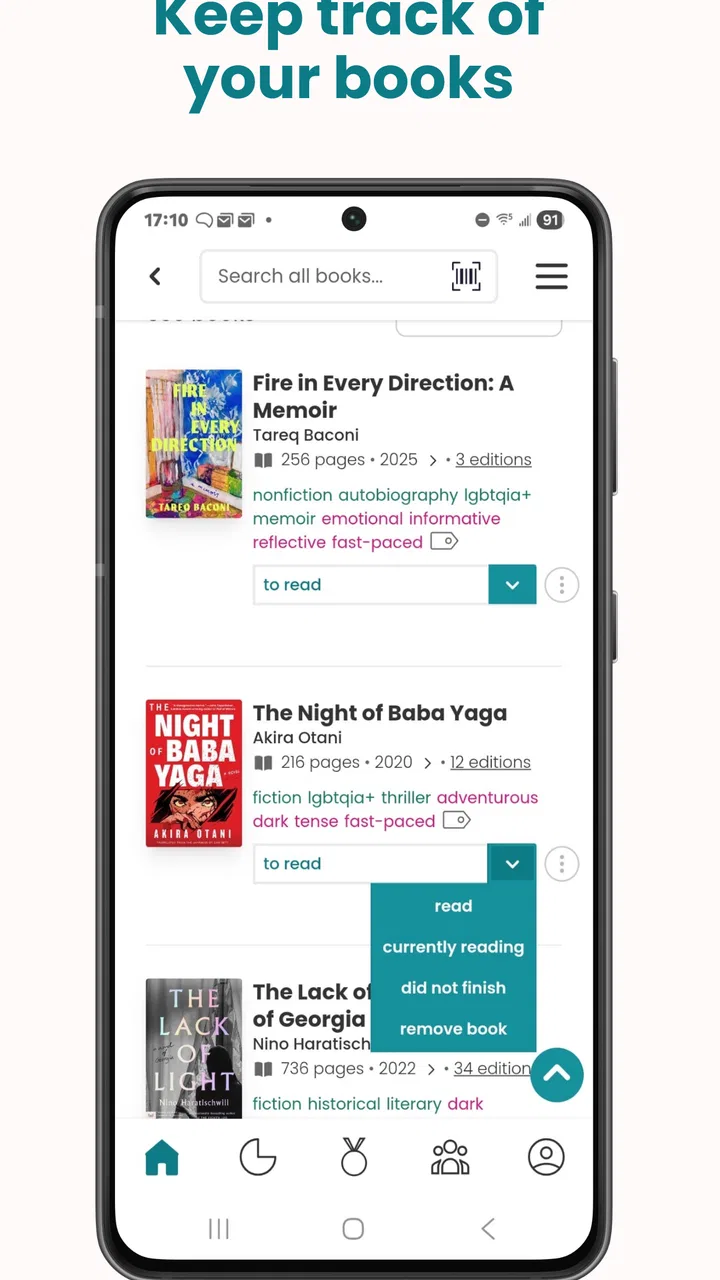
I usually know whether a reading app is useful within a few days: does it help me choose my next book, or does it simply turn my shelves into another list to maintain? StoryGraph is interesting because its central idea is more personal than a standard “read, rate, review” tracker. It pays attention to the kind of reading experience I want, especially my mood and preferred topics, then uses that information to make book discovery feel less random.
That makes it a good fit for readers who often stare at an enormous to-read pile without knowing what suits them tonight. I can be in the mood for something short and hopeful, or for a demanding, emotionally heavy novel, and the app is designed around that distinction. It is a free Books & Reference app from The StoryGraph, with optional in-app purchases ranging from $4.99 to $49.99 per item. Its Android release dates back to June 22, 2021, and the current version is 1.28 for devices running Android 8.0 or later.
Why mood-based discovery changes the reading routine
The strongest capability here is not merely storing a list of books. It is the attempt to connect a book recommendation with the reader I am today. Traditional library apps and retailer wish lists tend to organize books by title, author, genre, or popularity. Those categories are useful, but they do not answer a very ordinary question: “What do I actually feel like reading right now?”
You May Also Like

 Blood Strike: 2.5 Anniversary
Blood Strike’s Loadouts Turn Every Drop Into a Tactical Gamble
A close look at Blood Strike’s custom loadouts: how fast access to signature weapons reshapes its battle royale rhythm, rewards preparation, and narrows the gap between fights.

 Pandora - Music & Podcasts
Pandora’s Music Is Easy to Start, but Harder to Recover
Pandora’s strength is its low-effort path from a seed to a station. Its weak spot is how much confidence it asks you to place in connection, setup, and quiet recovery.

 8 Ball Pool
 Is Built on Rivalries, Rematches, and Routine
A close look at the rivalries, rematches, shared routines, and unanswered safety questions that turn a quick pool match into a persistent mobile community.

 Samsung Music
’s Quiet Strength Is Playing What You Already Own
Its reach comes less from spectacle than from dependable access to a personal library. That simplicity is both the app’s strongest retention engine and its ceiling.

 AccuWeather: Weather Radar
AccuWeather Review: A Quick, Clear Forecast for Everyday Decisions
For everyday plans, the best forecast is the one you can understand quickly. AccuWeather makes rain timing, radar, and local conditions easy to act on, with a few trade-offs.

 Hill Climb Racing
Why Hill Climb Racing Still Turns Crashes Into One More Run
A tiny car, a bumpy hill and one more upgrade: Hill Climb Racing keeps resurfacing because its simple chaos makes every near-miss feel personal.
More From Our News Desk



That question matters because a book can be excellent and still be the wrong choice for a particular evening. After a tiring day, I may want something light rather than a bleak thriller. During a long weekend, I may welcome a slower, more challenging story. StoryGraph’s mood and topic approach gives those preferences a more prominent role than a conventional star-rating system does.
In my experience, this makes the app feel less like a catalog and more like a reading companion. I am not only asking whether a book is popular. I am narrowing the choice according to tone, subject, and the kind of commitment I want to make. That is a meaningful difference for anyone whose reading habits change from week to week.
The app also benefits from separating discovery from judgment. A rating tells me how someone felt about a book overall, but it does not always tell me whether the book matches my current situation. A mood-oriented approach can reveal why a title might work: perhaps it is comforting, fast-paced, reflective, or emotionally intense. That extra context is more useful than another isolated number when I am choosing between several possibilities.
There is a practical psychological benefit too. A large reading list can create pressure. Instead of feeling excited by all the choices, I can feel guilty about the books I have not started. Filtering by mood makes the list more manageable. I can focus on a small group that fits my present interest instead of treating every saved title as an obligation.
Using the app as a decision tool rather than a digital bookshelf
The most effective way I found to use StoryGraph is to treat it as a decision tool. I would keep my broader reading plans in the background, then use the app when I needed to select one book. That small change prevented the experience from becoming another catalog-maintenance task.
For example, I might begin with a general intention such as wanting a thoughtful book that is not too long or emotionally exhausting. From there, the app’s focus on mood and favorite topics helps reduce the number of plausible choices. I still make the final decision, but I spend less time opening random descriptions and comparing unrelated titles.
This workflow is especially helpful when I am between genres. Sometimes I know I want fiction but do not know whether I want a mystery, family story, romance, or speculative setting. Mood can act as the bridge. A tense book and a sad book are not interchangeable, even if both appear under a broad fiction label. StoryGraph’s approach recognizes that distinction instead of forcing every decision through genre alone.
Another useful habit is to use the app before browsing a bookstore or library. I can identify the experience I want first, then look for a title that fits. That reverses the usual process, where an attractive cover or prominent display determines the choice. It does not remove serendipity, but it gives me a clearer starting point.
I would not expect the recommendations to replace personal curiosity. The app can help me narrow the field, but I still need to read the description, consider the author, and decide whether the subject is right for me. Its value is in reducing decision fatigue, not in making every choice automatically.
A realistic evening with StoryGraph
Imagine finishing work late on a Wednesday. I have enough energy to read, but not enough patience to scroll through hundreds of saved books. I open the app and think about the experience I want rather than a specific title. I might choose something engaging and hopeful, with a familiar topic, instead of a dense book I saved months ago because it sounded important.
That distinction is where the app earns its place. A normal reading tracker may remind me what I own or what I planned to read. StoryGraph can help me decide what fits the evening. If I choose a book and it turns out not to match my mood, I can change direction without feeling that I have failed a reading plan. The point is to make reading easier to start.
The same process works for a weekend trip. I may want a book that is absorbing but not so demanding that I cannot put it down and enjoy the rest of the day. Mood, topic, and the general shape of the reading experience become more useful than a generic “best books” list. This is a small feature in theory, but in practice it changes how quickly I get from indecision to reading.
It can also help with gifts. If I know a friend likes a particular topic but does not always want the same emotional tone, I can think beyond genre. A book that is technically in a favorite category may still be a poor gift if it is too dark, too slow, or too intense. StoryGraph encourages that more nuanced way of matching a book to a person.
Where the approach is less convincing
The mood-based system is not a substitute for a trusted friend who knows my taste. Mood is personal, and the same description can mean different things to different readers. A book labeled as uplifting may still contain difficult moments, while a serious subject can be handled in a comforting way. I still need to use judgment, especially when I am trying to avoid a particular theme.
There is also a learning curve in describing my own preferences. It is easy to say that I like fantasy or nonfiction. It is harder to decide whether I want something hopeful, reflective, tense, playful, or emotionally heavy. At first, choosing those qualities can feel like extra work. The benefit becomes clearer after I use the app as part of my regular reading routine rather than expecting one perfect recommendation immediately.
Readers who want a very simple tracker may find the focus unnecessary. If all I want is a private list of finished books and a quick rating, a basic notes app or a straightforward reading log may feel faster. StoryGraph is most worthwhile when I actually want help choosing books and am willing to give the app enough information to make that help relevant.
Its free availability makes trying it low-risk, but the optional purchases are worth keeping in mind. I can begin without paying, then decide whether the additional value justifies spending money. I would not subscribe simply because I wanted another place to store a list; I would consider it only if the discovery and tracking experience became part of my weekly reading habits.
The Teen content rating also gives a useful signal about the intended audience, although it should not be treated as a guarantee that every book will suit every teenager. Books cover many subjects and emotional levels. I would still check individual titles before recommending them to a younger reader or using the app for a family reading plan.
How it compares with familiar reading alternatives
A retailer wish list is excellent when I already know which books I want. It is less helpful when I want to describe a reading mood and discover something outside the obvious bestseller lists. StoryGraph feels more useful at that earlier stage, before I have a title in mind.
A library catalog is better for checking availability, editions, borrowing rules, and local access. I would use the library’s own tools for those practical questions. StoryGraph serves a different purpose: it helps me decide what kind of book I want to look for in the first place.
A social reading service can be more appealing if my main motivation is seeing what friends are reading or discussing books with a community. StoryGraph’s advantage, in the way I use it, is the personal filtering process. It is less about following a crowd and more about finding a match for my own reading state.
Paper lists still have one advantage: they are immediate and distraction-free. If I already know my next book, writing it down is quicker than opening an app. StoryGraph becomes the better option when the problem is not remembering a title but choosing among many titles.
That comparison points to the app’s real trade-off. It offers more thoughtful discovery than a basic tracker, but it asks me to participate more actively. I need to record books, express preferences, and pay attention to how recommendations fit. Readers who enjoy that involvement will get more from it than readers who want a completely passive service.
Small habits that make the recommendations more useful
One practical tip is to avoid describing every book in the same broad way. If I mark all my preferred moods as equally desirable, the filters lose some meaning. I get better results when I think about what I want most often and what I want only occasionally. That makes the app reflect my real reading patterns rather than an idealized list of everything I might enjoy.
A second tip is to use the app for different reading situations instead of searching for one permanent identity. My preferences for a commute, a holiday, a difficult week, and a quiet Sunday may be completely different. The app’s mood-centered design is more valuable when I allow those situations to change the search.
A third insight is that the tool can expose gaps in my reading habits. If I repeatedly choose the same emotional experience, I may notice that my reading list has become predictable. That does not mean I need to force myself into books I dislike, but it can encourage deliberate experimentation. I can look for a new topic while keeping the mood familiar, or keep the topic and try a different tone.
I also recommend using it before buying a book, not only after. A tempting cover and a short description can hide a mismatch in length, intensity, or subject. I can use the app’s discovery process to create a shortlist, then make the purchase or library decision separately. This reduces impulse choices without taking the fun out of browsing.
Finally, I would not judge the app after one search. Its usefulness depends on the quality of the reading picture I build over time. If I only open it when I am stuck, it has less context to work with. A few minutes of consistent tracking can make later discovery feel more personal and less like a generic recommendation feed.
Who should download it?
I would recommend StoryGraph to readers with an overflowing to-read list, people whose taste changes with their mood, and anyone who regularly abandons books because the timing feels wrong. It is also a strong choice for readers who want to move beyond genre labels and think about pace, emotional weight, and subject matter before committing to a title.
It is less suitable for someone who wants only a minimalist reading diary, a library availability checker, or a highly social book club experience. Those readers may prefer a simpler tracker, a library app, or a community-focused service. The app is not automatically better than those alternatives; it is better at a specific job: helping me choose a book that fits the experience I want now.
The service has built a substantial audience, with more than one million installs and an average rating of 4.3 from around six thousand ratings. Those figures suggest that its central idea resonates with many readers, while the roughly one thousand reviews show that people are engaging with it beyond a quick installation. I still see those numbers as background context rather than proof that it will match every reading style.
For me, the deciding question is simple: do I need help finding the right book, or do I only need to remember what I have read? If it is the first, this app offers a genuinely different way to browse. If it is the second, its mood and topic focus may be more structure than I need.
After using it as a companion for book selection, my opinion is positive but specific. I would not call it essential for every reader, and I would not use it as my only source of information about a book. I would keep it installed because it turns an annoying part of reading—the moment when I cannot choose—into a more manageable, personal process. The best reason to try StoryGraph is not to track more books, but to choose better books for the kind of day you are actually having.
FAQs for StoryGraph
01What is StoryGraph and how does it differ from other reading apps?
StoryGraph is a reading tracking app that offers personalized book recommendations based on your reading preferences and habits. Unlike other reading apps, StoryGraph provides detailed insights into your reading trends and allows users to track their mood and pace. It stands out for its focus on data and analytics, helping users discover books that truly match their interests.
02How does StoryGraph's recommendation system work?
StoryGraph’s recommendation system is powered by an algorithm that analyzes your reading history, preferences, and moods. By considering factors such as the types of books you enjoy, your reading speed, and emotional responses, StoryGraph curates a list of books tailored to your unique profile, making it easier to find your next great read.
03Can I import my reading data from other platforms into StoryGraph?
Yes, StoryGraph allows you to import your reading data from other platforms like Goodreads. This feature ensures that you do not lose your previous reading history and can seamlessly transition to using StoryGraph without starting from scratch. The import process is straightforward and user-friendly, making it easy to carry over your existing data.
04Is StoryGraph free to use, and are there any premium features?
StoryGraph offers a free version with robust features, but there is also a premium subscription available. The premium version, known as StoryGraph Plus, includes advanced features such as more detailed reading insights, additional customization options, and priority support. These features are designed to enhance the user experience for avid readers looking for in-depth analysis and customization.
05What platforms is StoryGraph available on, and how can I access it?
StoryGraph is accessible via its official website and is also available as a mobile app for both iOS and Android devices. This cross-platform availability allows users to track their reading habits and receive recommendations on the go, ensuring a seamless experience whether you’re at home or on the move.
Pros
- User-friendly interface for easy navigation.
- Offers personalized reading recommendations.
- Tracks diverse reading metrics and habits.
- Supports social sharing and community engagement.
- Allows detailed book reviews and ratings.
Cons
- Limited audiobook tracking options.
- Some features require premium subscription.
- Occasional syncing issues with other devices.
- No offline mode for full functionality.
- Lacks integration with certain e-readers.

StoryGraph
Gallery